
Use @mentions to get someone’s attention in the specification. When you add a 'Spec note' or 'Master note' to your specification or master, you can mention another team member using the '@' symbol.
This chat feature improves collaboration by notifying team members about tasks and keeping them informed.
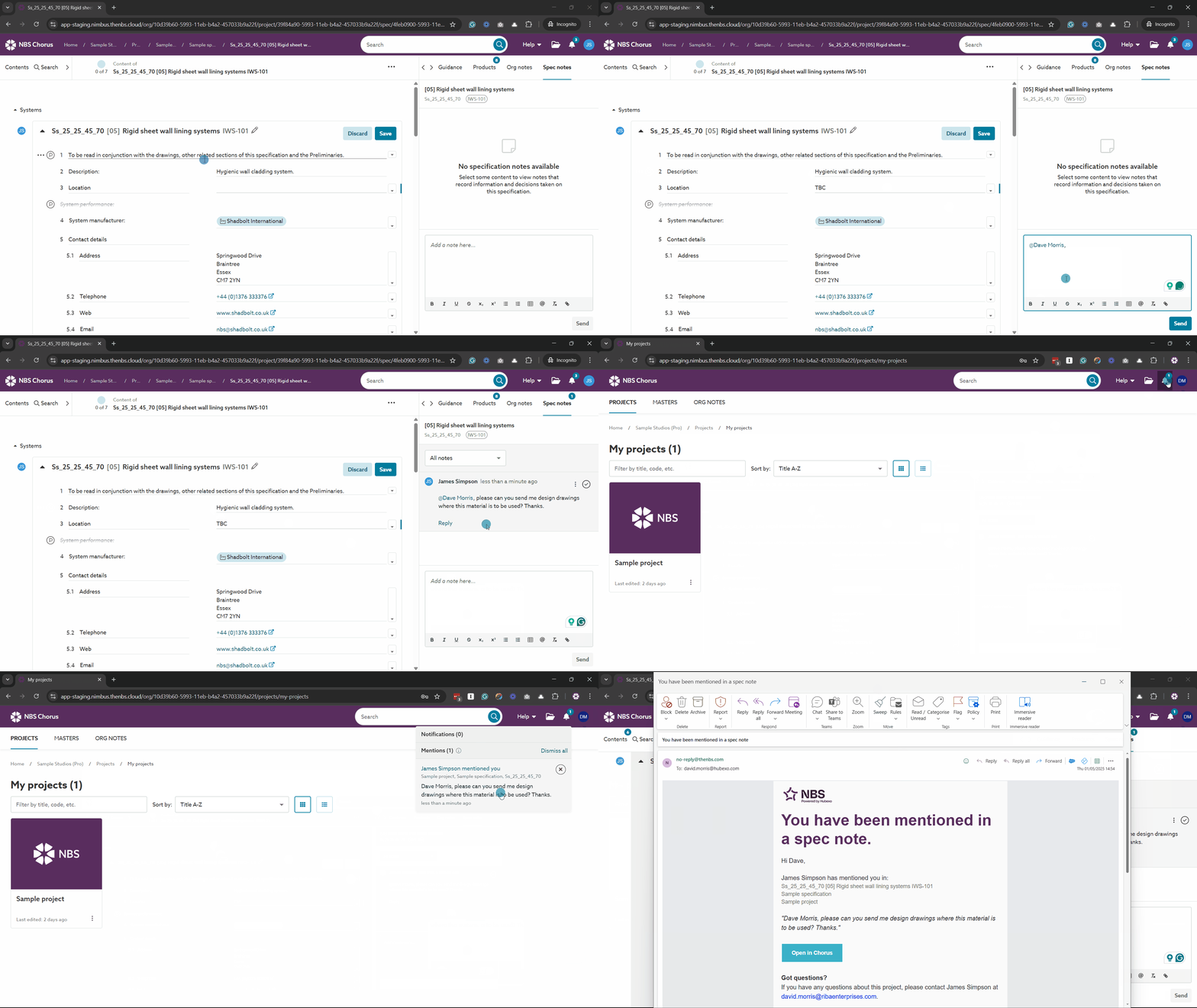
A screen capture displaying a user being mentioned in a 'Spec note', along with the notification and email they receive.
An overview
- You can chat with other 'Team members' within the ‘Spec notes’ and ‘Master notes’ panels in specifications and masters.
- ‘Spec notes’ and ‘Master notes’ can be added to whole sections, articles, clauses and rows. This provides context for your chat.
- You can @mention team members on the project who have ‘Reader’ or above permission on a given specification.
- You can @mention yourself as a reminder.
- When a team member is mentioned, the platform sends an email, and they will receive a notification in the ‘Mentions’ section of the notification menu.
- ‘My Mentions’ displays all notes in which you have been mentioned. This is particularly useful when collaborating on projects across multiple organizations, as it consolidates all your mentions in one place.
- You can 'Resolve' notes when the task is complete. Resolved notes can be filtered out of view and shown again when needed.
@mentions are in 'Spec notes' and 'Master notes', which are available with Pro (and above).
Related articles: