
This article explains how to select and change your role. Roles allow teams responsible for model development and specification to work together. The ‘Designer’ role allows access to coordinate model information with the specification without editing the specification. The ‘Writer’ role is for developing projects and masters, and managing your organization. Both roles can view the specification 'Guidance' and 'Org notes' together with viewing and adding 'Spec notes'.
Related article:
Designer and Writer roles – an overview
Designer and writer frequently asked questions
Please note: Designer roles are available for 'Pro' (and above) subscriptions. All existing customers automatically get the Writer role as part of their subscription (at no extra cost).

Designer is a cost-effective offering for organizations that want to coordinate the design model with the specification but don’t need all users to edit or write specification content. It is perfect for design teams to view and annotate specifications within their modelling environment. Request information
Select your role
You will be asked to ‘Select your role’ when you sign in to an organization that has Designer and Writer roles. This is shown for organizations with both roles and not shown for organizations that only have Writer.
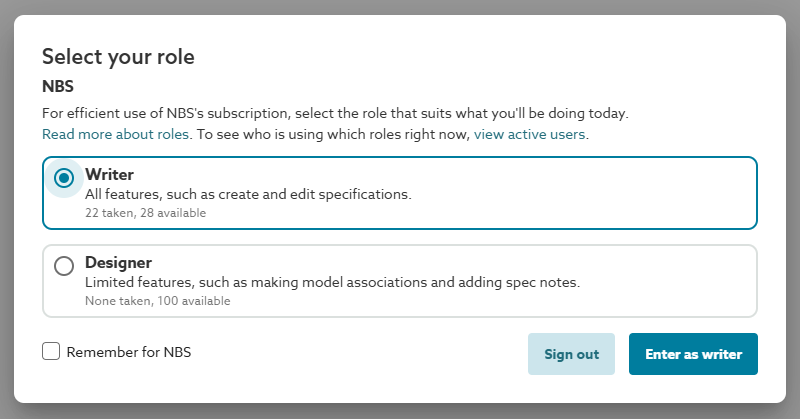
Screenshot showing the 'Select your role' dialog box when you sign in to the platform or change organization.
The dialog box contains the roles available for the organization, and information about which are available.
Active users – the ‘Select your role’ function contains a link to ‘Active’ users. This shows who is currently signed into the organization and which role they are using.
- Active users are shown to organization members but hidden to guests.
- Org admins can end the sessions of other users.
Related articles:
Who is counted as an active user?
Who can end active user sessions?
Designer – the Designer role is for users who mainly coordinate and synchronize model information with specification references, but don’t require permission to edit or write specification content.
Writer – the Writer role is for specifiers and users who manage their 'Organization settings' and 'Org notes'.
Choose this role if you are a third party (e.g. a manufacturer or specification consultant) collaborating with this organization, and you are responsible for writing the specification or copying specification content into the project.
Remember for – the ‘Remember for <organization name>' checkbox will save your role selection for this organization. When you sign in to the platform or open it in another tab, you will automatically get your preferred role. If your preferred role is full, the platform will show you the ‘select your role’ dialog box. You can see what is available and click on ‘Active users’ to see who is already signed in.
Change your role
After you have signed into the organization you can change your role from the profile menu: ‘Change your role’.
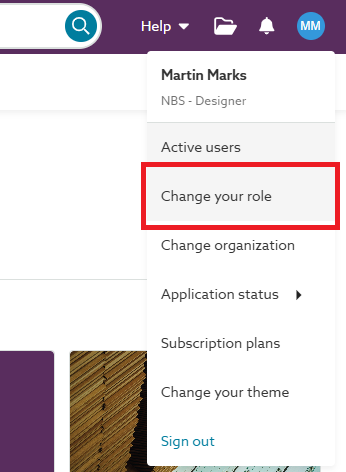
Screenshot showing the 'Change your role' option on the profile menu.
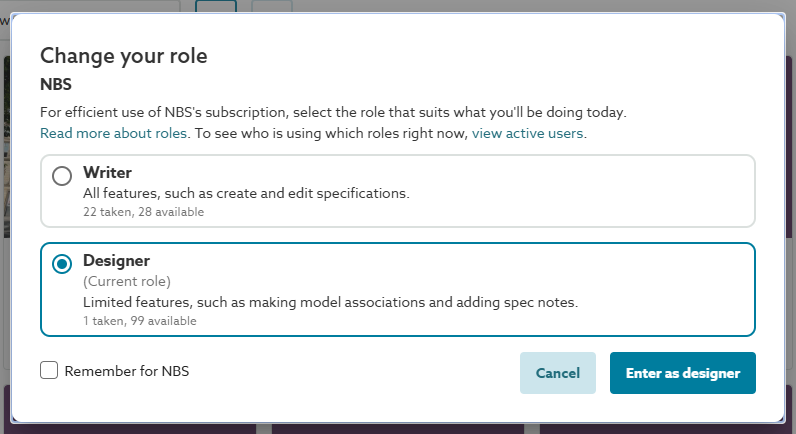
Screenshot showing the 'Change your role' dialog box.
The ‘Change your role’ function will:
- Indicate your current role for the organization.
- Show how many of each role are taken and available.