
This article explains how to export a list of organization users to an MS Excel file.
'Organization administrators' can export a list of all of their organization users to an MS Excel file from the 'User management' area.
- The list will include those organization users who have accepted their invitation and those with pending invitations.
- The list will identify 'Org admins' and 'Org users'.
Please note: This export will include all organization users from the 'User management' grid. It will not include guests. Guests are users who have been invited to collaborate on projects but are not organization users. A guest is intended for external 3rd parties, such as consultants who are not employed by your organization.
Related articles:
Adding Users to your organization
Inviting someone to collaborate on a project
Who can end active user sessions?
To export a list of organization users:
1. Click on your initials or avatar in the top right corner of the platform and then select the Organization settings option.
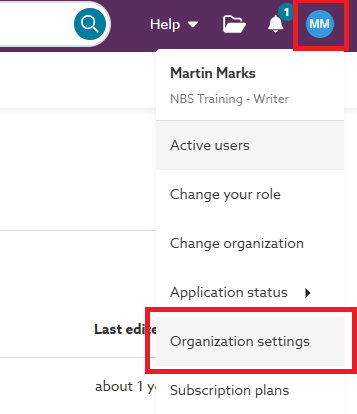 Note: If you do not see this option, you do not have the required 'Organization admin' role within your organization.
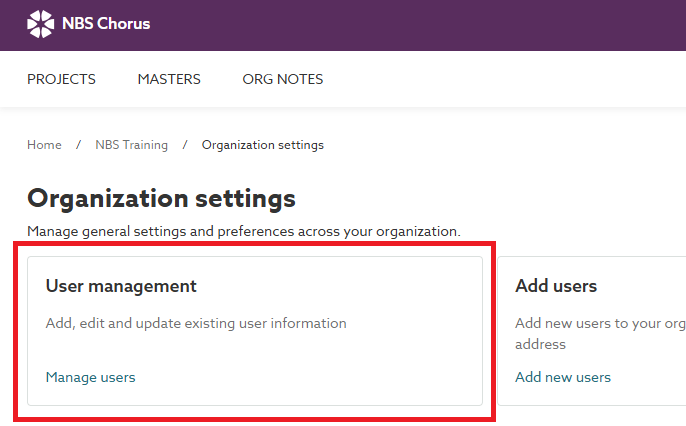
2. Click on the User management tile.
3. Click the Actions button and select the Export org users option from the menu.
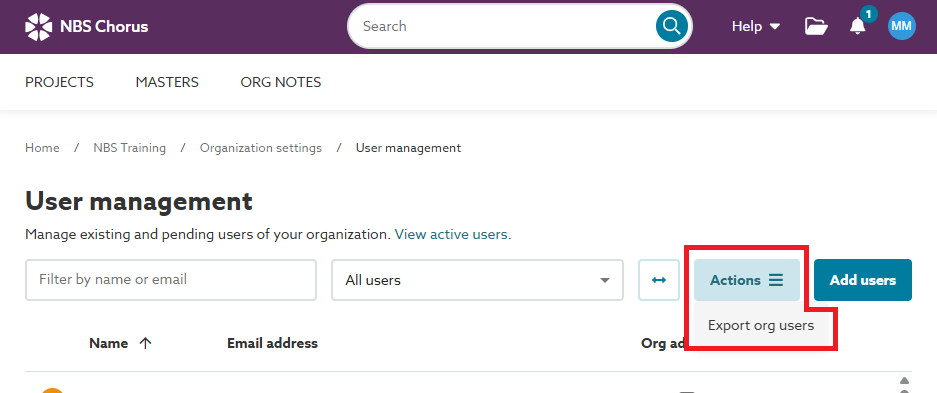
4. The platform will download an MS Excel file containing the list of organization users.Sample org users list exported from the platform.