
This article describes how to deploy changes to 'Reusable text' variables (RT variables), also known as Global text, in the Chorus Content Authoring Platform for our customer-facing content sets.
Related article: Reusable text (1/2): How to create and edit
In short:
- Variable changes are pushed through the active bundles.
- Chorus creates new bundles for clauses containing the variable changes that are not in active authoring.
- When the bundles are deployed, variable changes are released to the production content sets.
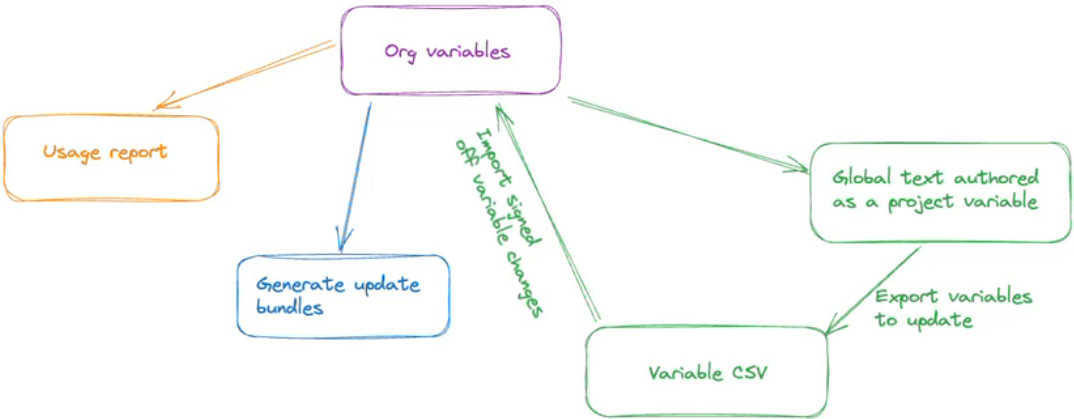
The workflow for authoring and deploying Reusable text variables in the Chorus Content Authoring Platform.
The process for editing and deploying RT variables is:
- Technical authors inform Production (Martin Day) which variable(s) have been updated and are ready to be pushed into bundles.
Related article: Reusable text (1/2): How to create and edit. - Production (Martin Day) will export the content set variables to CSV.
- On Chorus Sandbox > NBS Technical > Content sets > Open the 'Reusable text' content set.
- Click on 'Edit variables'.
- Select the variables that have been changed.
- Click the 'Actions' button, then 'Export variables'.
- Switch to the 'Organization settings' > 'Variables'.
- Click the 'Actions' button >'Import variables'.
See Importing and exporting variables.
- On Chorus Sandbox > NBS Technical > Content sets > Open the 'Reusable text' content set.
- Production (Martin Day) will 'Generate update bundles'.
- On Chorus Sandbox > NBS Technical >'Organization settings' > 'Variables'.
- Select the target variable(s) to be deployed.
- Click the 'Actions' button >'Generate update bundles'.
- Chorus will generate a 'Bundle update report'.
 A screenshot of the 'Bundle update report' highlighting the 'Part of bundle' and 'Variable update status' columns.
At the same time, Chorus also:- Updates the RT variable(s) in existing bundles and generates new bundles where necessary. Chorus will update the variable in a clause even if the clause is checked out.
- Records a 'Bundle note' against the article, clause or section containing the RT variables(s) to indicate that the variable was updated or could not be updated.
- The existing bundle will now show the updated reusable text in the 'Guidance'.
The 'Bundle changes' view displays the change to the guidance for the author. Each article/ clause/ section will display a 'Bundle note' to indicate whether the variable was updated (or not).
- Review the 'Bundle update report'.
The report tells us which bundle(s) contain our target variables and whether or not they were updated.- The 'Variable update status' column = TRUE
- 'True' indicates the variable was updated.
- The 'Part of bundle' column indicated which bundle the variable was updated in.
- If none of the existing bundles contain the target variable, Chorus will generate a new bundle.
- The bundle will be located in the appropriate content set. Its naming convention is:
'Updated variable bundle -### - {DD Month YYYY}. - Remember, a variable could be in more than one content set.
- 'Variable update status' = FALSE
- 'False' indicates the variable was not updated.
- A variable will not be updated when the bundle is in a read-only stage.
When this happens, there are two options:- Roll the target bundle(s) back to an editable stage > and re-run the 'Generate update bundles'.
- Deploy the bundle(s) to live > and re-run the 'Generate update bundles'. Chorus will generate new bundles for clauses that were not updated previously. Deploy these to live.
- The 'Variable update status' column = TRUE
- Normal bundle proofing and screen checking processes result in the bundle being signed off.
- Production (Martin Day) will deploy the bundles.
- Chorus will update the RT variable text in the content sets on Chorus 'Production' (live).
- Specifiers will receive a content set 'Update' notification, showing how the reusable text in the guidance has changed.