
When you publish your specification with 'Detailed revisions', this shows how the specification text has changed. This article explains how to include detailed revisions in your published specification.
Please note:
'Revision labels' are available with 'Pro'. 'Detailed revisions' are available with 'Premium'.

If you are using a custom stylesheet, i.e. when publishing, at the 'Styling' step you select a stylesheet other than the 'Default stylesheet'. To see detailed revisions in your published spec, your stylesheet must contain the detailed revisions styles. If you are using an existing stylesheet customized before July 2023, you may need to add the detailed revisions styles to it. Please see Updating existing stylesheets – adding detailed revisions styles.
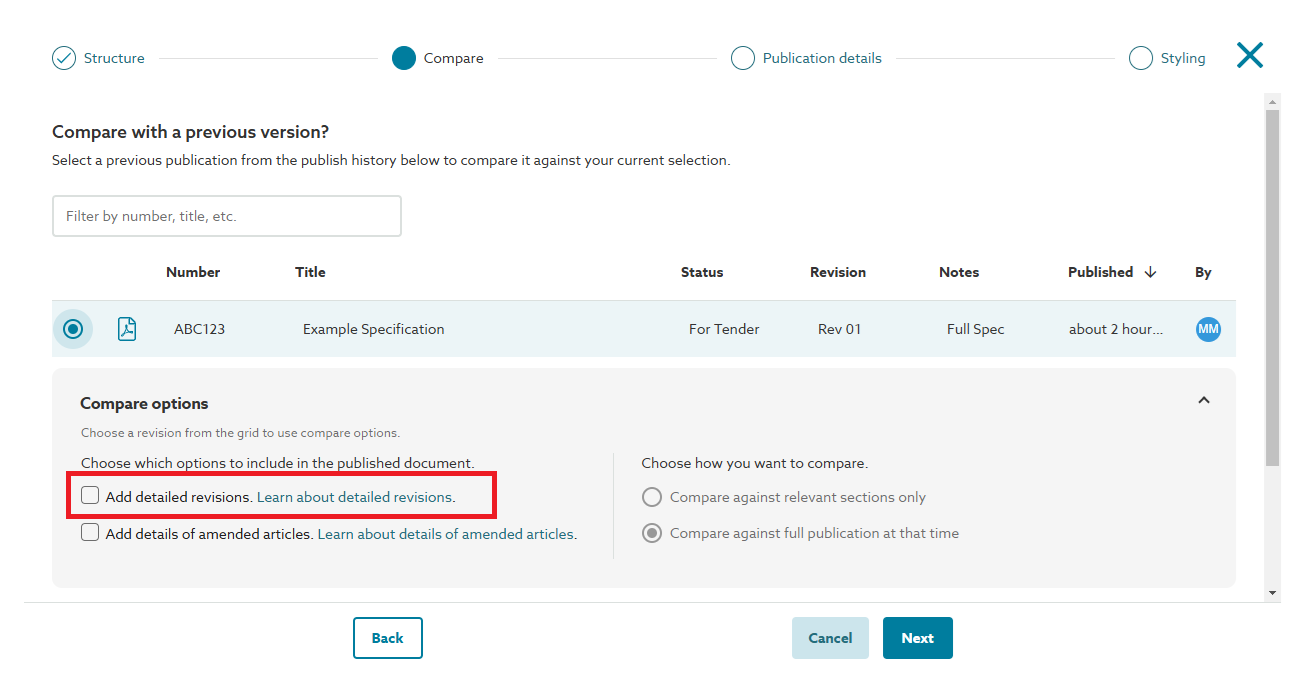
Screenshot showing 'Add detailed revisions' on the 'Compare' step of the publish specification wizard.
Steps to publish with detailed revisions:
- Publish your specification.
- On the ‘Compare’ step:
- Select a previous publication from the publish history grid to compare.
- Click the ‘Add detailed revisions’ checkbox.
- Complete the publishing wizard.