
You can publish your specifications using a customized stylesheet to suit your organization’s branding and layout standards. This article explains how to publish using a stylesheet uploaded to Lattira Spec and NBS Chorus (step 4 below).
The steps involved to customize and manage your custom stylesheets
- 01 Download the 'Default stylesheets templates' provided.
- Customize it to suit your brand standards. Change styles and lists, insert images, change margins and page layouts, etc.
- Uploading and managing your stylesheet templates
- How to upload the stylesheet template into the platform
- Testing that your stylesheet publishes as intended.
- Activating the stylesheet so that it is available for your organization users (but not guests) to use.
- Publish specifications using the custom stylesheet.
Please note: Custom stylesheets are available with 'Pro' and above.
Uploading and managing stylesheets is restricted to 'Organization administrators'.
Adding styling to your publication
The final step of the publish specification wizard is the Styling step.
Choose a stylesheet from the drop-down menu and click Publish.
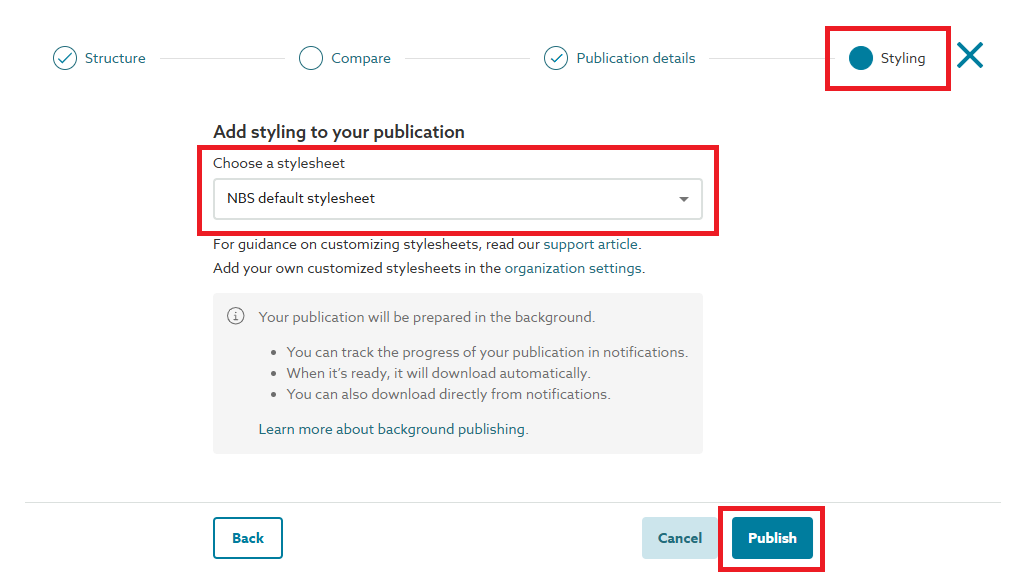
If you do not see the stylesheet you wish to use in this dropdown list, this may be because your 'Organization Admin(s)' have not uploaded or activated the custom stylesheet for general use within your organization.