
TABLE OF CONTENTS
- Background - Content sets and libraries
- 'This is a template. The NBS version is not part of your current subscription' message
- Adding content with a padlock icon
- 'This content is not part of your current subscription' message
- 'The NBS version is now part of your subscription' message
- Hiding libraries
- Video overview of content outside of a subscription and using the library filters
Background - Content sets and libraries
Each content set is subdivided into libraries. This is done to allow you to subscribe to the libraries you need without subscribing to the full content set.
| Content set | Libraries available | ||||||
| Australia - SpecPack | Architecture | Landscape | Services | Structure | Civil | ||
| Australia - SpeedSpec | Architecture | ||||||
| Australia - SureSpec | Architecture | Landscape | Services | Structure | Civil | ||
| Australia - Uniclass | Architecture | Landscape | Services | Structure | |||
| Canada - NMS & CMS | Architecture | Landscape | Services | Structure | Civil | ||
| Canada - NMS (French) | Architecture | Landscape | Services | Structure | Civil | ||
| Canada - NMS UniFormat | Architecture | Landscape | Services | Structure | Civil | ||
| Canada - NMS UniFormat (French) | Architecture | Landscape | Services | Structure | Civil | ||
| UK - CAWS | Building | Landscape | Small works | Early stage | |||
| UK - Uniclass | Architecture | Landscape | Services | Structure | Early stage | Services small works | |
| USA - USMS | Architecture | Landscape | Services | Structure | Civil | ||
An organization’s subscription determines which libraries are available for projects started on its profile.
For example, in ‘UK - CAWS’, the content set has been subdivided into four libraries: Building, Early stage, Landscape and Small works. Section Q31 ‘External planting’ is allocated to the Building and Landscape libraries. If your organization does not subscribe to one of these libraries, you will see a Padlock icon in the search results.
You can still add content with a padlock icon. When you add from a library not in your subscription, the platform will add a template. This allows you to author your specification clauses.
'This is a template. The NBS version is not part of your current subscription' message
You will see this message: ‘This is a template. The NBS version is not part of your current subscription’ in the editor when you are using content that is not included in your organization’s subscription.

Sometimes, you'll need to write a section or system using libraries you're not typically familiar with. For instance, you might want to create an outline before the client assigns other disciplines. To do this, you add content from all libraries in the content set. If you include content from a library outside your subscription, a template section is created to enable you to draft your specification clauses.
If you find you are using these templates regularly, we recommend adding the library to your subscription. By adding the library to your subscription, you will get pre-written articles/ clauses, which will save you time rather than writing them from scratch. You will also get specialist guidance, which will give you supporting information on the topic.
The contents of each library can be found in the scope of contents section theNBS.com/NBS-Chorus.
To add a library to the organization’s subscription, please contact your account manager.
Adding content with a padlock icon
You may see a Padlock icon and tooltip next to the content in the Add content screen.
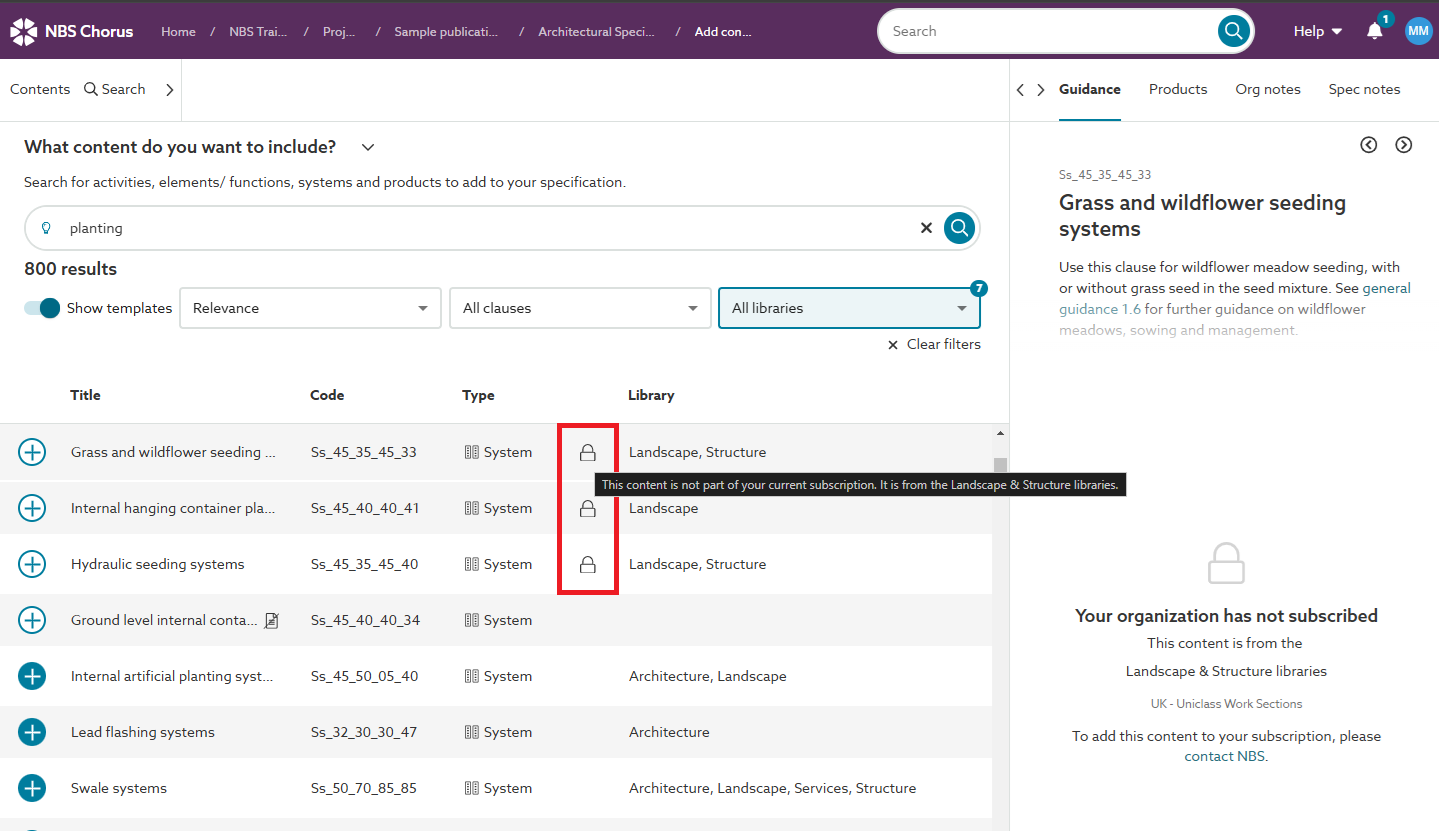
Screenshot showing the Padlock icon within the search results.
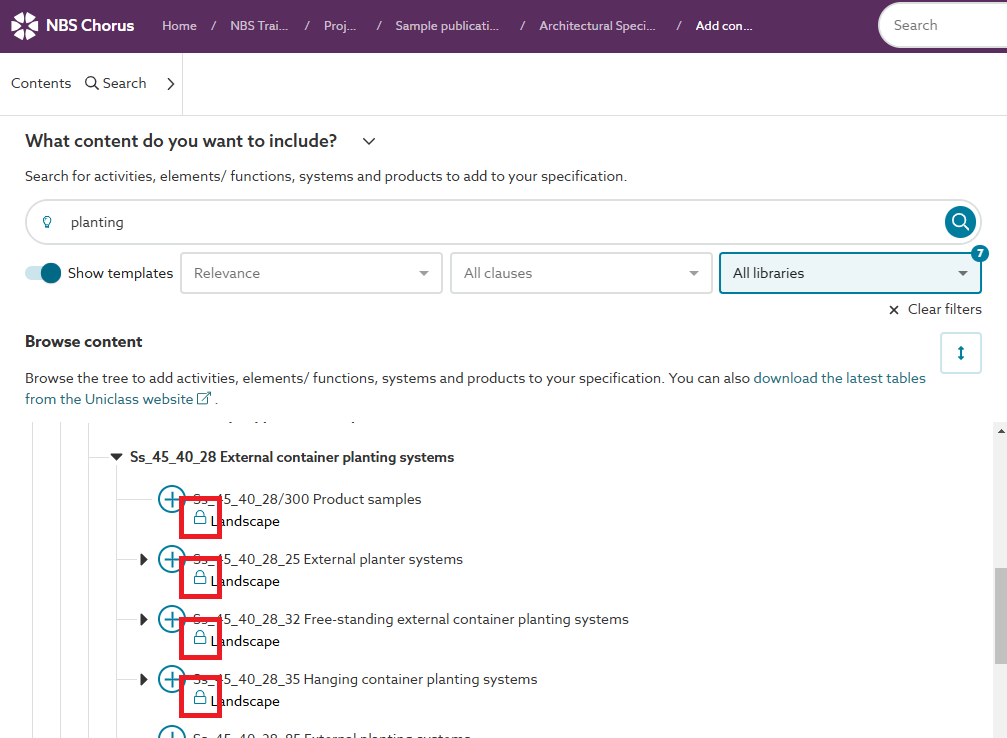
Screenshot showing the Padlock icon within the browse content tree.
For Uniclass Work Sections content sets, you may additionally see the Padlock icon and tooltip next to the content in the All content screen.
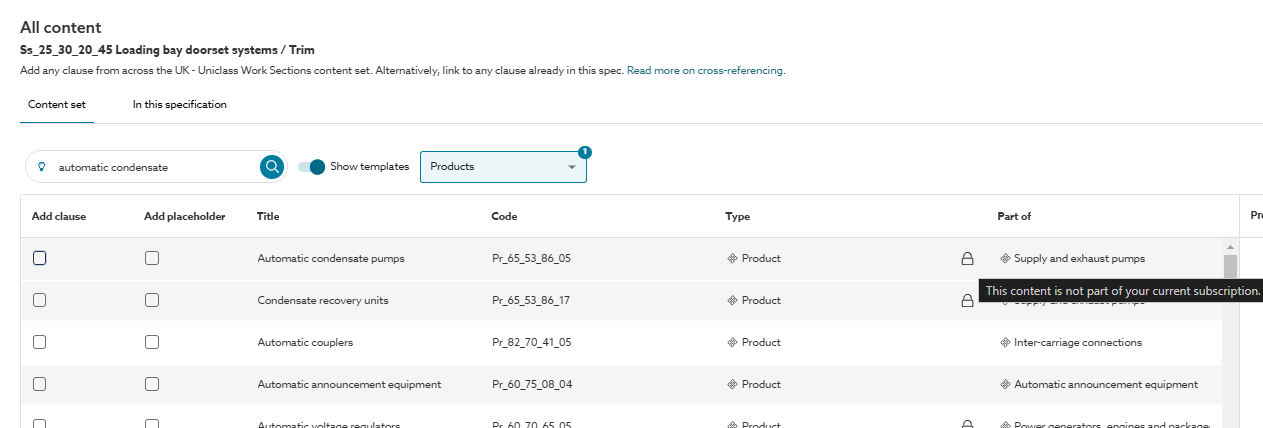
Screenshot showing the Padlock icon within the all content view.
'This content is not part of your current subscription' message
You will see this message; ‘This content is not part of your current subscription’ in the editor when you have previously added content that is now not included in your organization’s subscription.

You would see this message, for example, if you added a section/ system/ article/ clause from a library you used to subscribe to but do not anymore.
If you find you are using this content regularly we recommend adding the library to your subscription. By adding the library to your subscription you will unlock the specialist guidance which will give you supporting information on the topic.
'The NBS version is now part of your subscription' message
You will see the message, 'This was added as a template. The NBS version is now part of your subscription' in the editor when you have previously added content that was not included in your organization's subscription, and now it is included in the subscription.
The platform keeps the template sections/ systems/ articles/ clauses that you added when you didn't have the authored version in your subscription. It shows the authored guidance. If you want to use the authored sections/ systems/ articles/ clauses, you should add them from the content set into your spec and move your information over to them.

Hiding libraries
When you are searching/ browsing for content to add to your specification, you can filter out libraries. So if you only want to see results from the libraries you subscribe to and hide results with the padlock icon, you can do this.
At the top of the Add content screen, there will be Libraries drop-down field. Click into this drop-down field and deselect the libraries you do not want to see the results from. This setting is remembered for the future to save you from having to repeat this selection when you next sign into the platform.
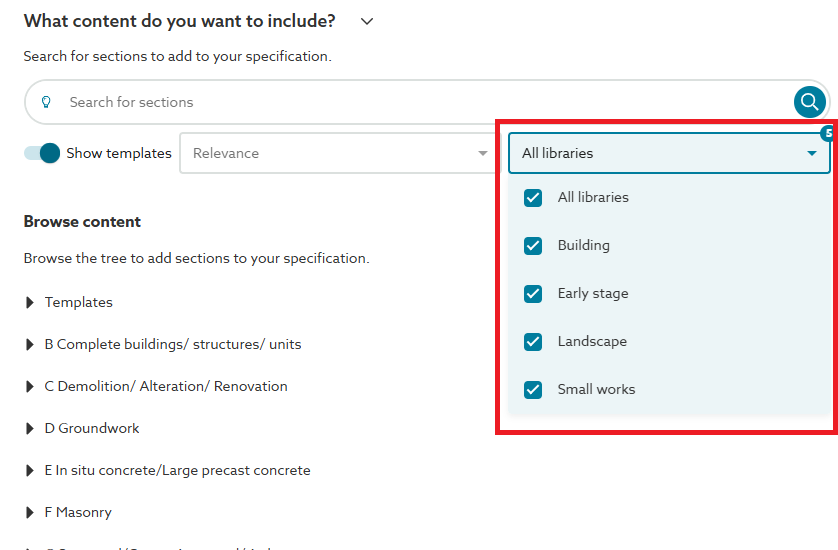
Video overview of content outside of a subscription and using the library filters
The short video (no audio) below demonstrates an example of content outside of a subscription and how to use the libraries filter.