
The specification warns you when you are about to associate something which is already associated.
Background to Association
You can coordinate objects in your Autodesk Revit model with content (such as articles or clauses) in your specification.
With the NBS Plug-in for Autodesk Revit installed, when you are editing the model in Autodesk Revit, you can display your specification in a panel directly in Revit. This specification panel allows you to associate objects in your open Revit model to specification content you have permission to associate or edit in the specification.
When you create an association, it is documented in the specification. Additionally, the specification details are entered into the object's Revit Type properties. What is entered?
Warnings
There are three possible warnings:
- Associating an object which is already associated with something in the same specification
This message happens when you try to associate an object that is already associated with something in that specification. For example, you associate a door object to a door clause. Then try to associate the same door object to a different clause in the same specification.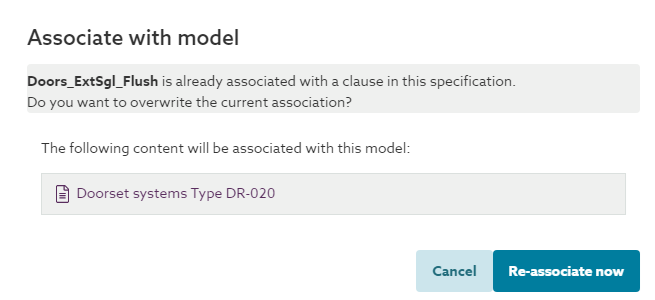 If confirmed (by clicking the Re-associate now button) then the existing association will be removed from the specification so there will not be any association errors to deal with. The type ID parameters in the object will be updated to match the new clause association. You may intend to do this if you made the wrong association originally. In this situation, click the Re-associate now button to ignore the message and continue.
The error message is a less intense colour than the other error messages to reflect that this won’t result in any inconsistencies between the model and the specification. - Associating an object which is already associated with something in a different specification that you have permission to (you are a Reader or above).
This message happens when you try to associate an object that is already associated with something in a different specification. For example, a door object has been associated to a door clause in one specification. Then you try to associate the same door object to a clause in a different specification.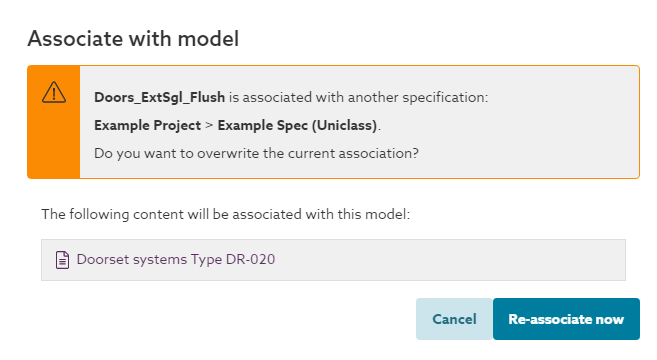 If confirmed (by clicking the Re-associate now button) the previous association will be broken and the type ID parameters in the object will be updated to match the new clause association. This would result in a model association error between the original spec and the model. Providing you have a designer (or above) role on the original specification, you would be able to identify and resolve the issue by navigating into the original model and spec, then scanning the model in the Model tab and reviewing the error in the Issues tab.
 - Associating an object which is already associated with something in a different spec you do not have permission to (i.e. you do not have a reader (or above) permission to the specification).
This message happens when you try to associate an object that is already associated with something in a different specification. For example, someone has associated a door object to a door clause in one specification. Then you try to associate the same door object to a clause in a different specification.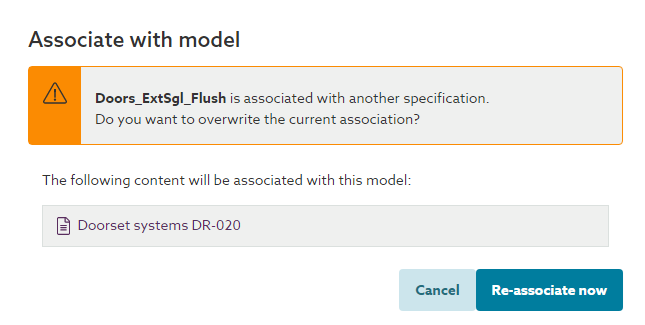
If confirmed (by clicking the Re-associate now button) the previous association will be broken and the type ID parameters in the object will be updated to match the new clause association. This would result in a model association error between the original spec and the model. You would not be able to identify and resolve the issue yourself, as you do not have the required permissions to the original specification. However someone who does would be able to by navigating into the original model and spec, then scanning the model in the Model tab and reviewing the error in the Issues tab.