
When publishing a specification, there are several options. These different selections will impact how changes appear when comparing two published specifications.
Please note:
The 'Compare' functionaity and publishing revisions is available with 'Pro' (and above) subscriptions.
Choosing between full or relevant 'Compare options'
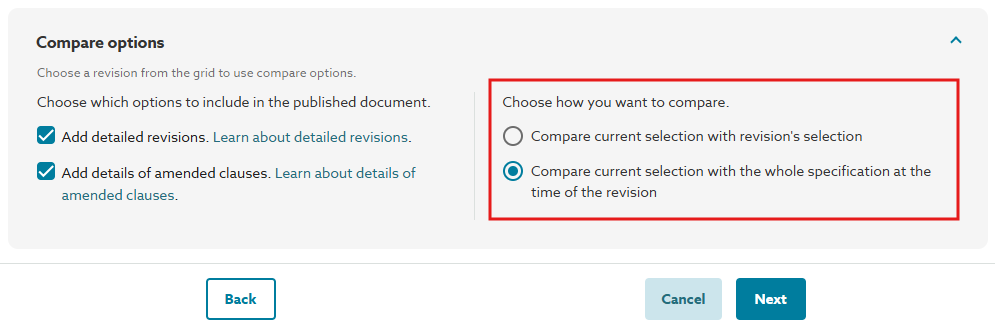 This is a screenshot of the 'Compare options' modal in the 'Compare' step.
‘Compare current selection with revision's selection'
This means that when the clauses you publish differ from those in the specification you are comparing against, the differences will be shown as ‘ADDED’ and ‘DELETED’. This option is preferable when you want to identify differences in the selection of clauses you publish versus the publish history record you are comparing against.
Scenario 1: A clause was published in the previous specification, and:
- It is also in the current publishing selection.
- It has changed. It will show the ‘REVISED’ revision label.
- It has not changed. Unchanged clauses do now show a revision label.
- It is not included in your current publishing selection. It will show the ‘DELETED’ revision label.
Scenario 2: A clause was not published in the previous specification, and:
- It is in the current publishing selection; it will show the ‘ADDED’ revision label.
This is a screenshot of the Table of Contents of a published specification that has been compared to a previous version and has been revised, deleted, and added to.
‘Compare current selection with the whole specification at the time of the revision’
This means the platform will compare the articles and clauses you are publishing now with the entire contents of the specification at the previous point in time, not what was published in the specification you are comparing with. This comparison does not focus on the specific publication you are comparing. This option is different because changes in the scope of what is being published will show as ‘REVISED’ or unchanged.
This option is preferable when you only want to compare the clauses you are publishing now with how they have changed since the time of the publish history record you are comparing against.
Scenario 1: (no change to the behaviour above) A clause was published in the previous specification, and:
- It is also in the current publishing selection.
- It has changed. It will show the ‘REVISED’ revision label.
- It has not changed. Unchanged clauses do not show a revision label.
- It is not published with the current selection.
- It is not published with the current selection. It will show the ‘DELETED’ revision label.
Scenario 2: A clause was not published in the previous specification, but it was in the contents of the specification, and:
- It has changed. It will show the ‘REVISED’ revision label.
- It hasn’t changed. Unchanged clauses do now show a revision label.
Scenario 3: A clause was not published in the previous specification or included in the current selection.
- No matter if the clause has changed or not, if it is included in the specification at the time of publishing, it will be marked as 'Deleted' in the table of contents. If this is not what you want, please select 'Compare against relevant sections only' during the comparison stage when publishing.
Related articles: